
Thermostat with Auto Heat and Cool: How It Works
If your thermostat can heat in the morning and cool by afternoon, who decides when it should do neither? Most guides treat that pause as an afterthought. It's the setting that determines whether a thermostat with auto heat and cool feels steady or fights itself all day.
What Auto Heat and Cool Actually Does
A thermostat with auto heat and cool chooses heating or cooling for you based on two separate setpoints. Say you set heat to 68°F and cool to 77°F on a spring day in Tucson. The furnace runs only if the room drops below 68°F, the air conditioner runs only if it rises above 77°F, and nothing runs in between.
Think of the thermostat as a referee with a wide neutral zone. It doesn't chase one exact number, and it doesn't whistle on every small movement. That inactive range between the setpoints is the deadband, and it's what keeps a cool morning and a warm afternoon from turning into constant switching.
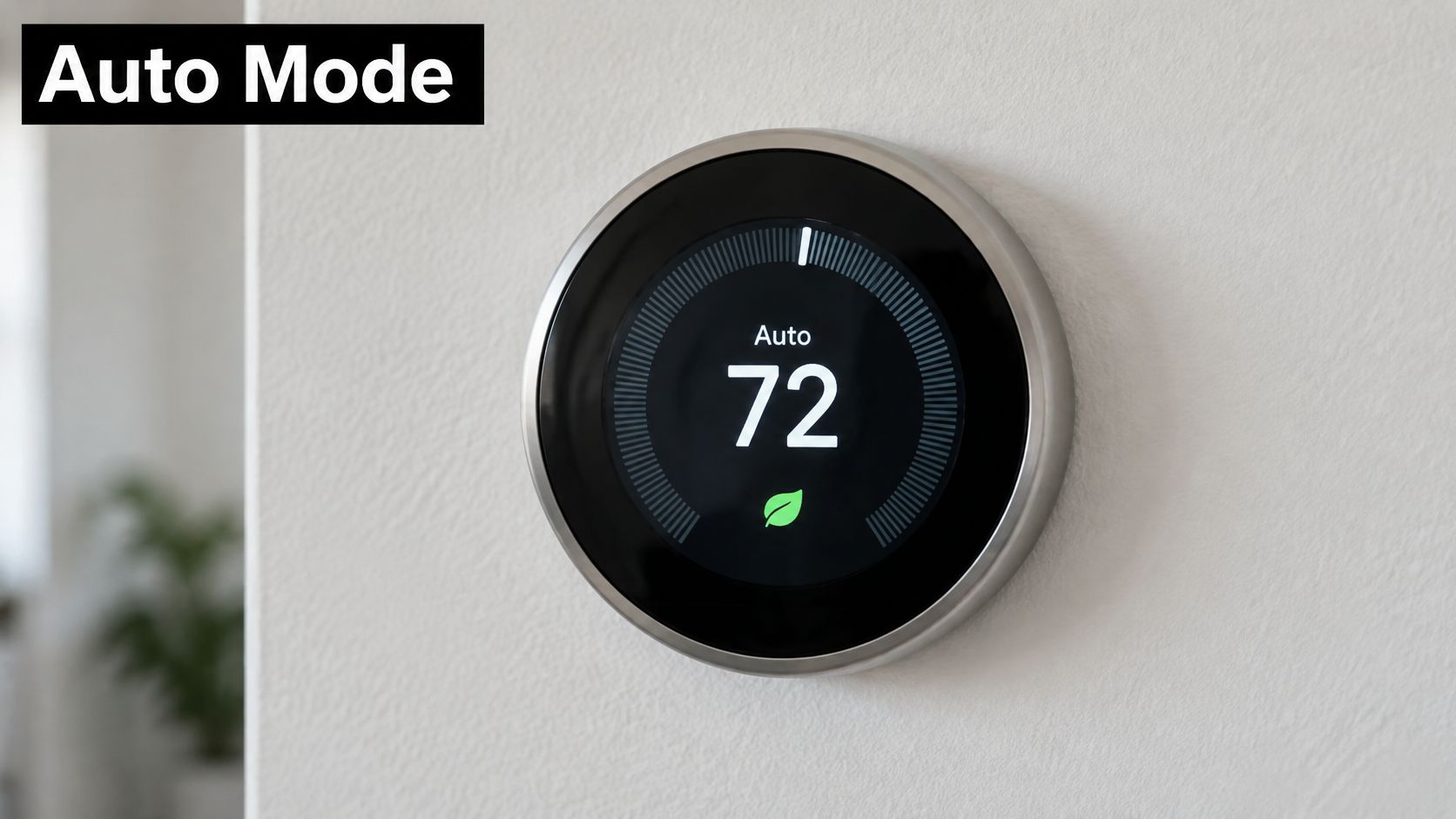
The Three Auto Confusions
Mode set to Auto: The thermostat may change between heating and cooling on its own.
Fan set to Auto: The blower runs only during a heating or cooling call. It doesn't choose the mode.
One target temperature: Auto doesn't hold, say, exactly 72°F all day. It holds a range.
In Johnson Controls auto changeover documentation, the thermostat switches to cooling when room temperature rises above the cooling changeover line and to heating when it falls below the heating changeover line. If the setpoints aren't spaced far enough apart, it keeps its previous mode instead of changing immediately. The same documentation specifies a minimum switching duration of 20 minutes after an automatic mode change.
Auto on the mode selector and Auto on the fan are two different decisions. Check both before you blame the equipment.
That distinction applies beyond central HVAC, too. Homeowners comparing electric heating options often run into similar control questions when managing storage heater running costs, where timing and setpoints decide what you pay. For your system, the first check is simple: confirm the mode reads Auto, not only Heat or Cool.
Deadband Settings Compared Across Thermostats
The numbers below show why there's no universal deadband. Brands define the range differently, and some settings control mode changeover while others control when a stage starts.
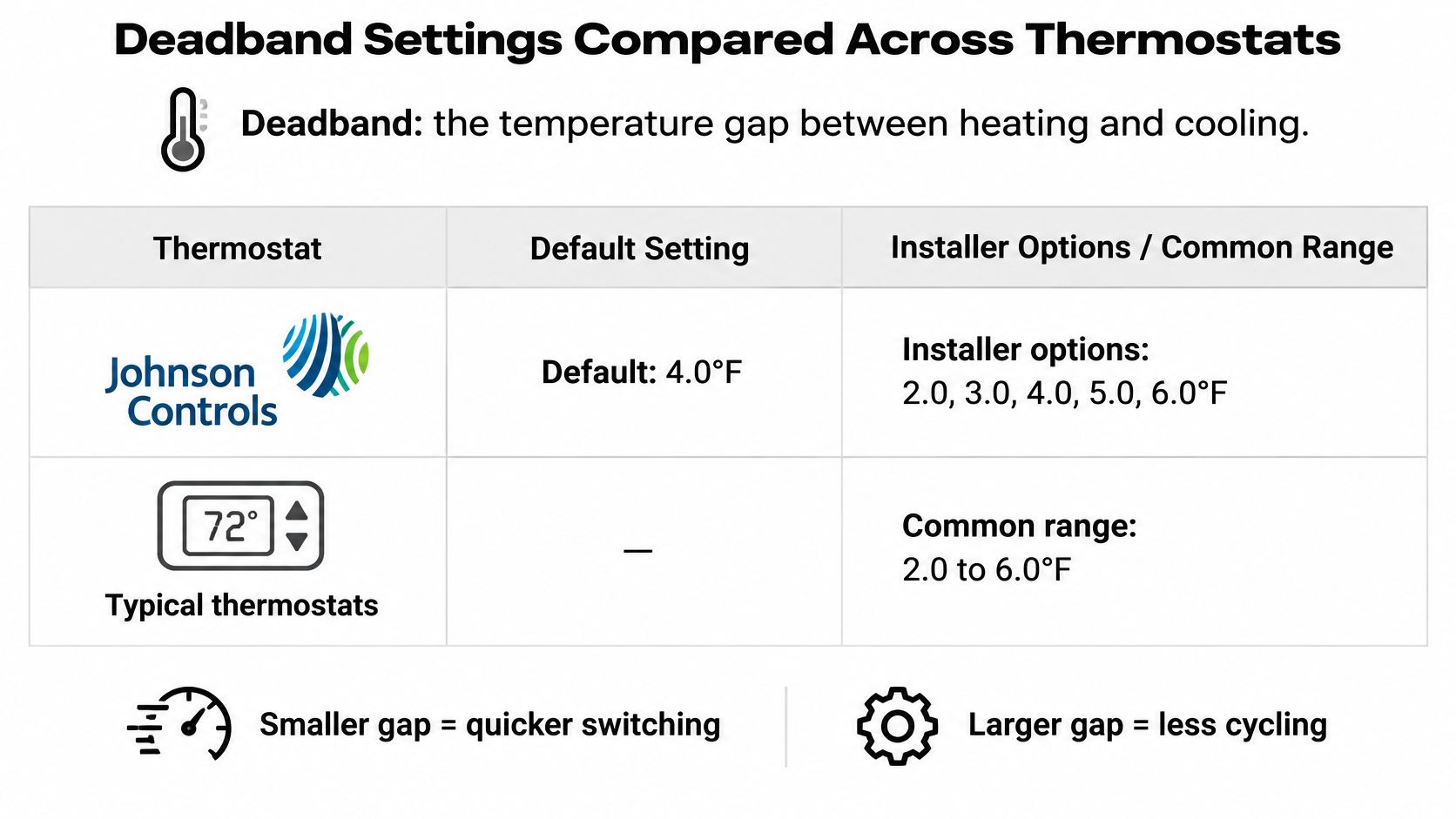
Thermostat or standard | Selectable deadband | Default | Practical note |
|---|---|---|---|
Johnson Controls fan coil or PTAC thermostat | 2.0, 3.0, 4.0, or 5.0°F | 4.0°F | Available only in heat and cool with automatic changeover |
Honeywell digital fan coil, heat and cool setpoints | 2 to 9°F | 3°F | Minimum distance between the heat and cool setpoints |
Honeywell digital fan coil, single setpoint | 2 to 6°F switching differential | 3°F | Heat switches at setpoint minus differential, cool at setpoint plus differential |
Venstar T1100RF, first-stage deadband | 1 to 6°F | 2°F | At least 2°F recommended to limit short cycling |
ASHRAE/IES 90.1 minimum for heating and cooling controls | At least 5°F adjustable; at least 1°F maintained | No default, it's a minimum rule | Minimum requirement for controls that serve both heating and cooling |
In the Johnson Controls auto deadband guide, the documented default is 4.0°F, with installer options of 2.0°F, 3.0°F, 4.0°F, or 5.0°F. A Honeywell digital fan coil manual allows a 2°F to 9°F deadband with a 3°F default for separate setpoints, and a 2°F to 6°F switching differential for a single setpoint. The Venstar T1100RF manual sets first-stage deadband from 1°F to 6°F with a 2°F default, and recommends at least 2°F to help avoid short cycling.
Separately, ANSI/ASHRAE/IES Standard 90.1 requires controls serving both heating and cooling to be capable of at least a 5°F adjustable deadband and to maintain at least 1°F even when setpoints are close together. That's a capability rule for the control, not a promise that 5°F is right for your house.
Work the Math Once
Take heat at 68°F and cool at 75°F. The gap is 7°F. With a 3°F deadband, the thermostat needs a gap greater than twice the deadband, and 7 is greater than 6, so it can sit off in the middle. With the 4°F default, 7 is not greater than 8, so it holds its previous mode instead.
This short video walkthrough helps you see where those settings live on a real thermostat before you change anything.
Practical rule: Start with the manufacturer default. Widen the gap only if the system switches too often.
Which Systems Support Auto Changeover
Compatibility isn't just about the thermostat on the wall. The equipment behind it decides what Auto can safely do.
System type | How auto changeover behaves | Key check | Common issue |
|---|---|---|---|
Gas furnace with central AC | Switches between furnace heat and AC cooling at the setpoint thresholds | Confirm wiring matches the furnace and air handler | Rapid switching when the deadband is too narrow |
Single-stage heat pump | Uses the compressor for both heating and cooling | Verify the O/B reversing valve setting | Auxiliary heat runs during large setbacks or cold weather |
Dual-fuel heat pump with gas backup | Changes to furnace heat when outdoor temperature falls below the balance point | Confirm balance-point and compressor lockout settings | Both heat sources can be energized if the changeover is misconfigured |
Ductless mini-split | Often controlled by the indoor unit or its remote, not the wall thermostat | Check whether the manufacturer supports auto mode on the controller | Thermostat mode and unit mode disagree |
A furnace and AC pair is the simplest case because two separate machines each do one job. A heat pump is different because one compressor heats and cools, and the O/B reversing valve setting tells it which direction to run. If you're unsure what that valve does, start with how a heat pump works before you touch installer settings.
Where Heat Pumps Get Expensive
Here's the candid part. On a heat pump, Auto isn't only choosing heat versus cool. It's also interacting with auxiliary heat logic. A large setback, a rapid recovery demand, defrost operation, or cold outdoor conditions can call electric resistance backup heat even though the display just says heating.
According to ACEEE technical literature on smart thermostats and heat pumps, electric resistance backup heat generally consumes substantially more electricity per delivered unit of heat than normal heat-pump operation, and DOE guidance cited there cautions against setbacks that trigger it. A compatible thermostat should support equipment-specific staging, compressor lockouts, outdoor-temperature balance-point logic, and timed auxiliary-heat delays where available.
A technician should confirm:
Wiring configuration: The terminals match the manufacturer's setup for your equipment.
O/B behavior: The reversing valve energizes in the right mode.
Auxiliary-heat limits: Backup heat doesn't stage up too early.
Controlled recovery test: Amperage and staging are measured while the system recovers.
If AUX heat runs during routine recovery, don't ignore it. Unexpected AUX operation can signal incorrect configuration, inadequate airflow, a capacity problem, or an overly aggressive recovery setting. For snowbirds and part-time homes in Arizona, moderate setbacks and gradual recovery are safer than abrupt jumps.
Energy Savings and Comfort Trade-offs
Auto changeover can save energy, but it isn't magic. ENERGY STAR smart thermostat guidance estimates average savings of about 8% on heating and cooling bills, or approximately $50 per year per household. Certified devices must demonstrate at least an 8% reduction in annual heating runtime and a 10% reduction in annual cooling runtime under specified statistical tests.
Your result will vary with climate, equipment, insulation, duct performance, occupancy, and comfort preferences. Auto helps most when it prevents a delayed manual switch, such as a house that keeps heating on a warm afternoon because nobody changed the mode. It helps least when the setpoints are so tight that the system works against itself.
The Trade-offs in Plain Terms
Fewer manual switches: Less avoidable runtime during swing seasons.
Wide gap: Fewer cycles, but the room can drift before either system starts.
Narrow gap: Tighter comfort, but more starts, more wear, and possible short cycling.
Heat pump backup: Aggressive recovery can erase savings through resistance heat.
If you're choosing setpoints with savings in mind, what temperature to set your thermostat for big savings is a useful companion to the deadband math. Facility teams face the same balance at larger scale, which is why an HVAC playbook for facility managers treats setpoint discipline as an operating decision, not a one-time setup.
There's one more question to ask if you join a utility program. A California Energy Commission filing on demand-responsive controls describes thermostats that may raise cooling setpoints or lower heating setpoints by 1 to 4°F during grid events, then restore the original settings. Before you enroll, check whether participation is optional, how override controls work, and whether the thermostat separates normal heat-pump operation from auxiliary heat.
Who controls your setpoints during a grid event, and can you override it? Answer that before you enroll, not during a hot afternoon.
How to Program Auto Heat and Cool Step by Step
Work in order, and change one thing at a time. If you change the mode, the fan, and both setpoints at once, you won't know which adjustment fixed or caused a problem.
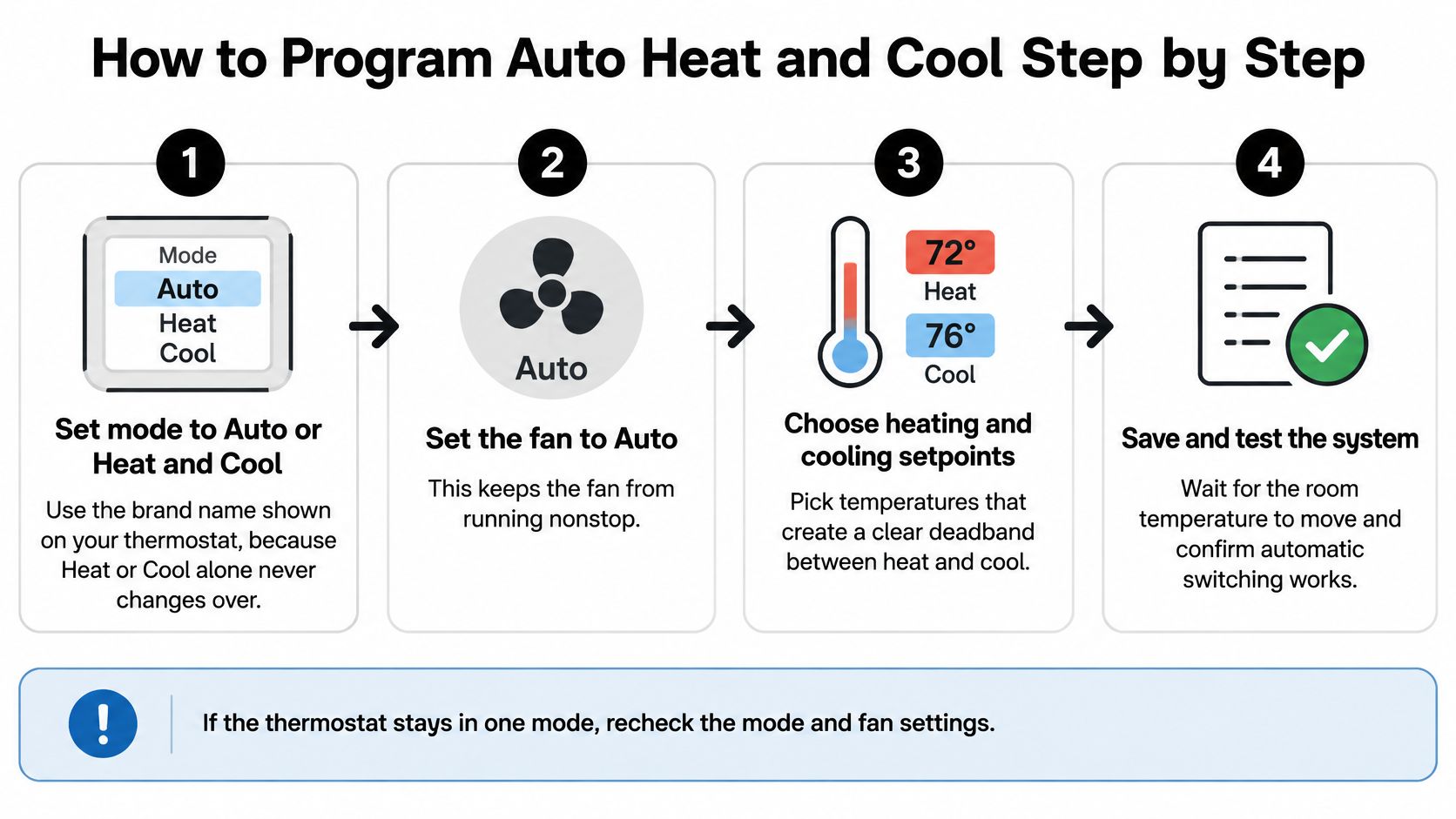
Set the mode to Auto or Heat and Cool. Use the name your brand shows on screen. Heat alone or Cool alone will never change over, no matter how far the temperature moves. If you don't see Auto, your thermostat or wiring may not support it.
Set the fan to Auto. This is separate from step 1. Fan Auto means the blower runs only when there's a heating or cooling call, while Fan On runs it continuously and can make a correct setup look broken.
Check the deadband before you enter setpoints. Look up the default or installer setting in the manual or installer menu. Then choose a heat and cool pair whose gap is larger than twice that deadband. Skipping this order is where most setups go wrong.
Enter a pair that passes the math. With a 3°F deadband, 68°F heat and 75°F cool works because the 7°F gap is greater than 6. With a 4°F deadband, widen to at least a 9°F gap, such as 68°F heat and 77°F cool, so the thermostat can switch off between them.
Adjust the deadband only if your model allows it. Start with the default. Widen it only if the system switches too often, and stay inside the range the brand permits. Lowering it for tighter comfort on oversized equipment often buys you short cycling instead.
Finish the Setup Properly
Turn off schedules that move both setpoints together. A schedule, remote sensor average, or smart recovery feature can collapse the gap you just created. If you use a schedule, check every period, not just the current one. For schedule basics, see how to program a thermostat to save money and boost efficiency.
Observe for 48 hours. Count mode changes, note cycle length, and watch whether AUX heat appears during recovery. Write down the times. A note that says "AUX at 6:10 a.m. after setback" is far more useful than "it runs a lot."
Adjust one value at a time and record it. Move one setpoint, wait, and observe again. Keep a simple log with the date, both setpoints, the deadband, and what changed.
A correct setup looks boring. The indoor temperature stays in range, cycles are complete rather than frantic, and heating and cooling never run in conflict. If you can't achieve that with setpoints alone, the problem is probably configuration or equipment, not your patience.
Symptoms That Point to a Setup Problem
Start with the symptom you can see, then match it to the likely cause. Don't start by buying a new thermostat.
Symptom | Likely cause | Fix |
|---|---|---|
Heating and cooling switch several times a day | Deadband too narrow for the setpoint gap | Widen the setpoint gap so it exceeds twice the deadband, starting from the manufacturer default |
Both heating and cooling run within the same hour | Overlapping setpoints or a changeover wiring conflict | Widen the gap, then have a technician verify wiring and changeover settings |
Auxiliary heat turns on during recovery | Large setback or heat pump capacity limit | Reduce the setback size, use gradual recovery, and have staging tested |
Mode does not switch from cool to heat | Auto not selected, or setpoints too close together | Set the mode to Auto and widen the gap |
Fan runs constantly | Fan set to On instead of Auto | Set the fan to Auto and confirm the mode is separate from the fan setting |
What You Can Fix Today
Setpoint spacing, the mode selector, the fan setting, and setback size are same-day adjustments. Make one change, then give the system time to complete normal cycles before judging it. If the display is blank, unresponsive, or showing errors beyond a settings issue, work through what to do when your thermostat is not working before assuming the outdoor unit failed.
Wiring conflicts, staging problems, and repeated AUX operation need a technician. That's especially true on dual-fuel and heat-pump systems, where a wrong changeover setting can energize equipment in conflict. Clean filters and clear airflow still matter, and homeowners looking at the maintenance side can lower energy bills with HVAC maintenance by keeping the system from working harder than it should.
Same-day test: If widening the gap stops the switching, it was a settings problem. If it doesn't, stop adjusting and get the wiring and staging checked.
Confirm Your Setup With a Professional
Use this decision rule. Adjust setpoints, schedules, and the fan setting yourself. Call a professional when the system is a heat pump or dual-fuel setup, when auxiliary heat runs during routine recovery, when both systems run in the same hour, when the wiring or O/B setting is unknown, or when a utility demand-response program needs integration.
You wouldn't be unusual for asking for help. In a Resideo survey fact sheet, 49% of more than 2,000 surveyed U.S. homeowners in 2024 said they would most likely use a professional to install a smart thermostat. The value isn't the screws on the wall plate. It's verifying staging, amperage, and changeover behavior under a controlled test that you can't confirm from the display alone.
What to Bring to the Visit
Current setpoints: Your heat and cool numbers for every schedule period.
Deadband setting: The value from the installer menu, if you can view it.
System type: Furnace with AC, heat pump, dual fuel, or mini-split.
AUX activity: When it ran, for how long, and what the setback was.
That record shortens diagnosis and helps you judge advice clearly, much like the questions in how to choose an HVAC contractor. We service all makes and models of HVAC systems, and our services include HVAC installations, repairs, maintenance, and system upgrades. We also offer a free A/C unit check-up, which is a practical way to confirm your current setup before swing-season weather tests it.
Write your four items down today, while the settings are in front of you. Bring that record when you book, and the visit starts with answers instead of guesswork.
If your thermostat is switching too often, running AUX heat during recovery, or refusing to change over, we can verify the deadband, wiring, staging, and setpoints as part of installation, repair, maintenance, or a system upgrade for all makes and models. Schedule a free A/C unit check-up or a thermostat setup visit through Covenant Aire Solutions, and bring your current heat setpoint, cool setpoint, deadband, system type, and any AUX activity you recorded.